

Featured Content Block
Original Publish Date: 06/11/2025 by Elisaveta Naumoska
Last Edited on: 06/11/2025 by captivatewiki
<div class="further-read-box">
<div class="further-left">
<img src="https://media.wifh.com/wp-content/uploads/2023/11/The-Dangers-of-Black-Market-Botox.jpg" alt="The Dangers of Black Market Botox®" /></div>
<div class="further-right">The Dangers of Black Market Botox®
<a href="https://www.wifh.com/blog/dangers-black-market-botox/" target="_blank" rel="noopener">Read More</a></div>
</div>
Instructions:
- Open the code editor
- Copy-paste the snippet where needed
- <img src=”https://media.wifh.com/wp-content/uploads/…
- Go to the media library
- Search for the featured image with dimensions 301×215, by typing the featured blogpost title
- Click on the image and click on “copy URL to clipboard”
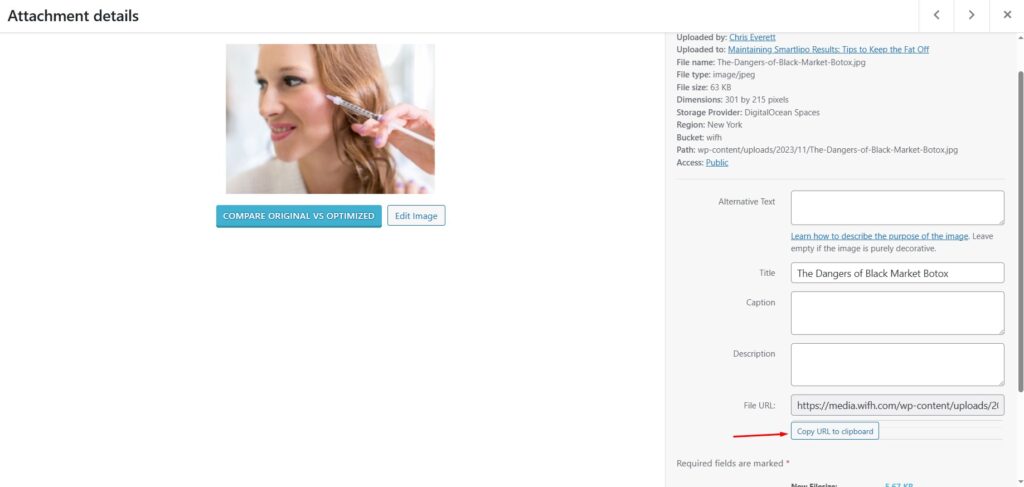
- Replace the source url
- If you can’t find the featured image:
- Go to the featured blogpost and download the featured image
- Resize and crop to fit 301×215 px
- Make sure the image file name is the blog title, so we can easily find it in the library for future use
- eg. The-Dangers-of-Black-Market-Botox.jpg
- Upload it in the media library
- Copy the URL and replace the image src url in the content block
- alt=“The Dangers of Black Market Botox®”
- Make sure the alt attribute is the featured blog title
- <div class=”further-right”>The Dangers of Black Market Botox®
- The featured blog title goes here
- If you need to insert a line break, type <br> where you want the line break
- eg. The Dangers of <br>Black Market Botox®
- It’s going to be displayed like this
The Dangers of
Black Market Botox®
- The button: <a href=”https://www.wifh.com/blog/dangers-black-market-botox/” target=”_blank” rel=”noopener”>Read More</a></div>
- Update the href attribute with the right link