

How to Schedule Social Content via Sprout Social
Original Publish Date: 05/14/2025 by Phoebe Torres
Last Edited on: 05/14/2025 by Phoebe Torres
We’ve gotten approval of a deck of social content – yippee!
- First, finalize the imagery.
- Ask the designers to send you the image license numbers (don’t forget to drop them the links to the approved client decks so they have a reference)—they’ll send you a list of numbers like this:

- Search for the numbers and license the images through Adobe Stock (or whatever stock house was used to source the images in the first place. It should be Adobe Stock for HN & BPRF).
- BEFORE YOU LICENSE: double check they are the right images by cross referencing the images in the deck
- License the images and send them back to the designers to finalize the creative.
- Before sending, count how many stock numbers the designer sent and make sure you have downloaded the same amount – sometimes the download will fail. Just
- Next, the designers will send you a folder of the licensed creative. Make sure all the files have the licensed imagery by checking if the watermarks are gone (they should be at this point, but always double check)
- Open up Sprout Social, the UTM campaign builder, and the approved deck of content.
- Schedule posts!
- Copy the caption, link, and hashtags from the deck and paste them into a new post in Sprout.
- Shorten the link with the UTM campaign tool.

This is how the UTM Campaign Builder info should look.
- Paste the shortened link back into Sprout.
- Adjust spacing in the caption where needed.
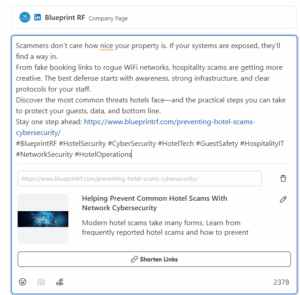
Before (full sized link, caption spacing not yet adjusted)
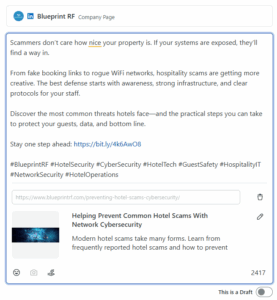
After (shortened link, caption spacing added)
- Upload the image (also at this point, put the licensed image in the client deck)
- Choose date/time
- HN & BPRF posts will publish PST (West Coast time). Schedule them to publish before 3pm EST, so between 9am and 12pm PST. That way, you’ll be able to confirm they have published by 3pm EST.
- Try to make publish times varied. For event posts or holiday posts, schedule to post right around 9am.
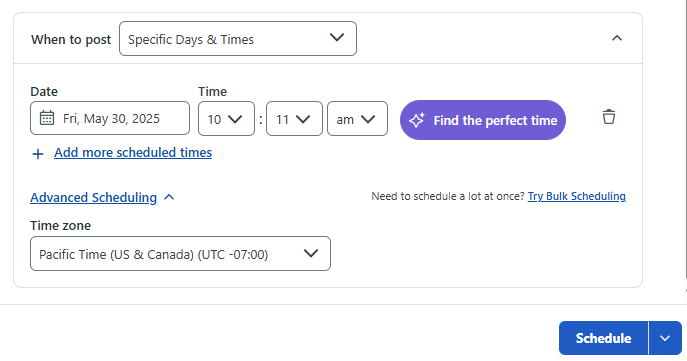
- Tagging people
- Press @ and the person/org profile will show as you type
- Sometimes this doesnt work! If so: Go to the client account in LinkedIn, look up account youre trying to tag, and follow it. That should make it appear when you @ tag them in Sprout.
- If this fails, you’ll have to wait til the post is live, go into LinkedIn, edit the post and @ tag them from there.